 Security and Login
Security and Login: ISO 27001, SSO and Secure Access
Your data is safe, your access is under your control
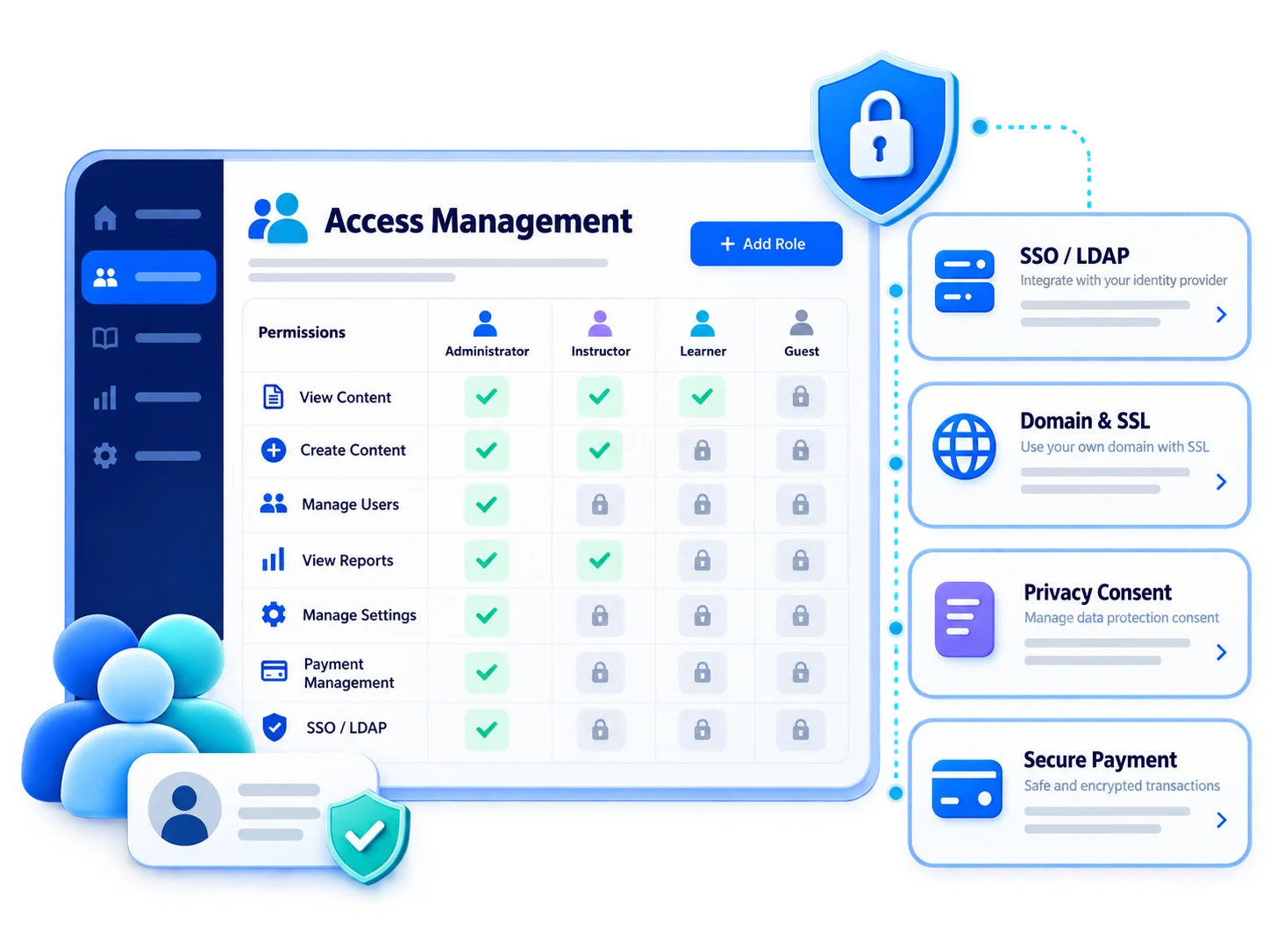
Work on a platform that is ISO 27001 and ISO 27701 certified, GDPR compliant, and hosted on Microsoft Azure. Let users log in with their corporate accounts via SSO and LDAP, and access is managed according to roles.

 ISO 27001
and 27701
ISO 27001
and 27701 SSO and
LDAP
SSO and
LDAP Role-based
access
Role-based
access Domain name
and SSL
Domain name
and SSL Periodic
backup
Periodic
backup
Layered security from input to data
Users log in via SSO with their corporate accounts, and the directory remains synchronized with LDAP. Each user accesses the content that their role allows; The data is protected by periodic backup in certified infrastructure.

- 1Login with Institutional Account
- 2Role Authorizations
- 3Access Restrictions
- 4Transmission via SSL
- 5Redundant Infrastructure
What can you do with Security and Login?
Vedubox protects your corporate training data at international standards and leaves access under your control.
International Certificates
ISO/IEC 27001, ISO 27701 and ISO 9001 certifications.

GDPR and KVKK
Full compliance with GDPR; Edit the KVKK approval text according to your needs.

Microsoft Azure Infrastructure
The platform is hosted exclusively on Microsoft Azure.

Login with SSO and LDAP
Users log in with single sign-on with their corporate accounts.
Role Based Access
Everyone only accesses content for which they are authorized.

Content Access Restrictions
Restrict records and documents to specific branches or user groups.
Secure Payment
Card information is processed on the PCI compliant network, it is not kept in the Vedubox infrastructure.
Periodic Backup
Data is kept protected by periodic backups.
A layered security approach, not just passwords
Security and Login; It combines certified infrastructure, corporate identity management and role-based authorization. Security vulnerabilities are constantly monitored, fixed and prevented.
- Connect users with SSO and LDAP
- Authorize access by roles
- Use your own domain with SSL
- Customize KVKK approval text
- Make sales without keeping card information on the platform
For every audience, secure access

IT and Security Teams
SSO, LDAP and role authorization

Customers
Secure customer academy access

Sales Teams
Single sign-on with institution account

Dealers / Partners
Partner-based content restrictions

Universities
Secure login with campus directories

Regulated Sectors
Audit-ready logging and access control
Single sign-on, controlled access with corporate identity
Let your employees log in via SSO with their corporate accounts, and keep your user directory synchronized with LDAP. Sensitive training records should only be opened to relevant branches; All data should be protected in certified infrastructure.

Ecosystem
Security and Login work with other components of the Vedubox ecosystem.
Security and Login
Provide secure login

API and Integrations
Connect your systems

Branding and Landing Pages
Reflect your brand

Online Training Sales Portal
Sell your training
Online Exam Proctoring
Secure the exam
LMS / LXP
Publish and manage training
Mobile App
Access training on your phone

AI Assistant
Support learning with your organization’s knowledge

Reporting
Report results
WhySecurity
and Login?
Certified safety
Processes documented with ISO 27001, 27701 and 9001.

Corporate identity
Single sign-on with SSO and LDAP.
Controlled access
Everyone only sees the content they are authorized to do.
Continuous protection
Security vulnerabilities are constantly monitored and data is backed up.
One Platform
Security is at the same standard in all Vedubox modules.
Built for Enterprise Scale
Infrastructure that complies with corporate security expectations.
Manage your training data securely
Certified infrastructure, corporate identity and role-based access on a single platform.