SCORM Support
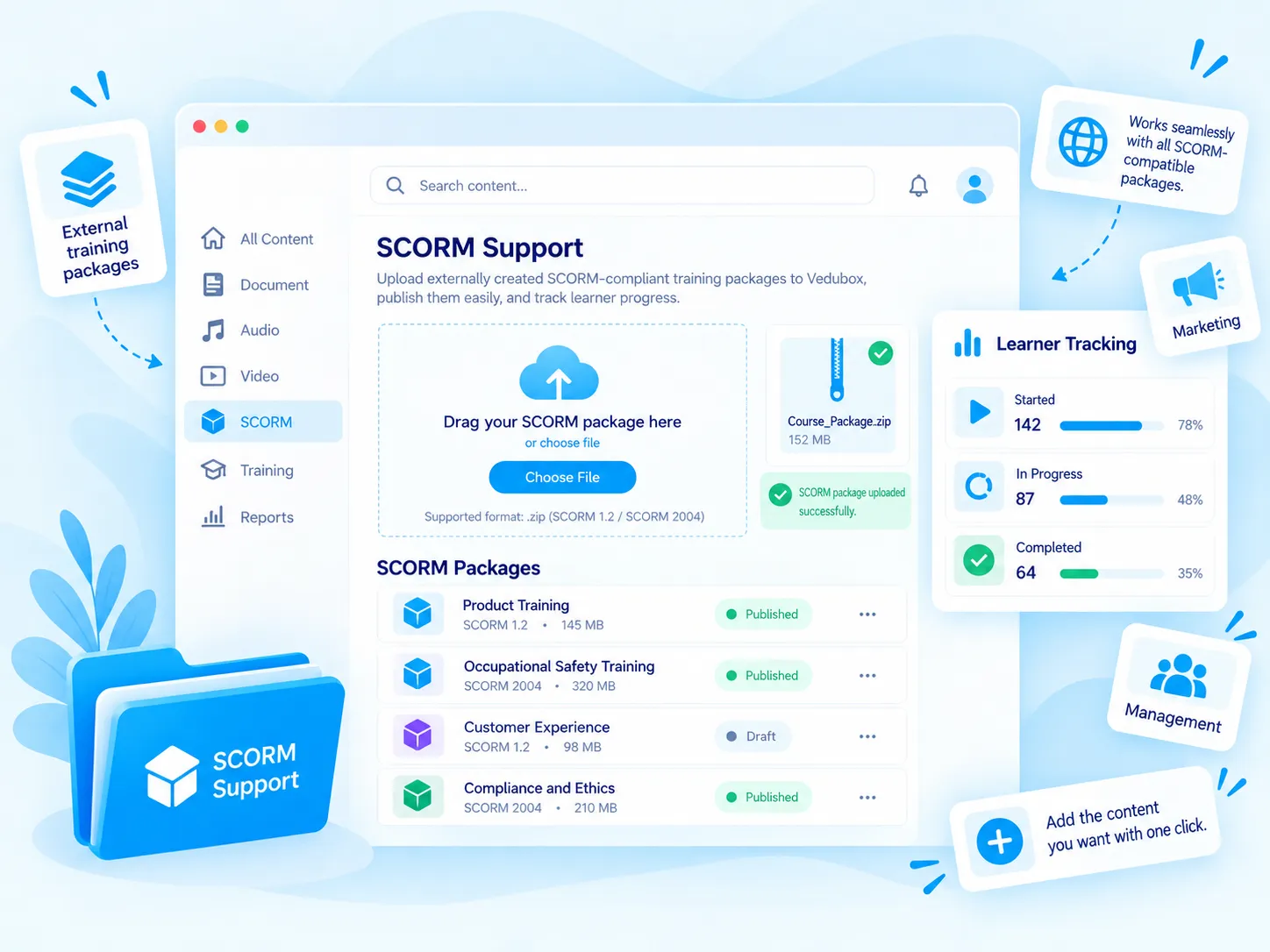
Vedubox supports the SCORM 1.2 and SCORM 2004 standards. Upload content prepared with tools such as Articulate, Adobe Captivate and iSpring to the platform, add it to your trainings and track progress.

Upload the SCORM package

SCORM 1.2 and 2004 support

Set a minimum duration

Track the time spent
What Is SCORM Support?
SCORM is a standard that lets e-learning content run on different platforms. Vedubox supports SCORM 1.2 and SCORM 2004 packages; content prepared with tools such as Articulate, Adobe Captivate and iSpring can be uploaded to the platform and tracked.
You can add SCORM content to your trainings or upload it to the Content Library to use it again and again. You can set a minimum duration for content and track the time a user spends on it in minutes.

What Does Your Organisation Gain?
SCORM content you buy from outside or your team builds isn’t wasted; it is added to your training flow without needing another system.
You see from the time spent whether the content was really reviewed, and reuse the same content from the library in different trainings.

What Can You Do?
All the options for SCORM support at a glance.
<style>.nk .nw-sar{flex-wrap:wrap;align-content:center;gap:6px}.nw-cip{display:inline-flex;align-items:center;gap:6px;padding:6px 11px;border-radius:999px;background:#f4f8fb;border:1px solid #e3ebf2;font-size:13px;font-weight:700;color:#5b6b80;white-space:nowrap}.nw-cip img{width:16px;height:16px}.nw-cip.nw-mavi{background:#eef8fe;border-color:#bfe3f4;color:#1581b3}.nk .nk-w{gap:12px}.nw-ikonkutu{flex:none;display:grid;place-items:center;width:42px;height:42px;border-radius:12px;background:#e3f3fb}.nw-ikonkutu img{width:22px;height:22px}.nw-durum{display:flex;flex-direction:column;gap:2px;font-size:14px;line-height:1.25;color:#1a1a2e}.nw-durum b{font-weight:700}.nw-durum em{display:inline-flex;align-items:center;gap:6px;font-style:normal;font-size:12.5px;font-weight:700;color:#1581b3}.nw-durum em i{width:7px;height:7px;border-radius:50%;background:#28aae1;box-shadow:0 0 0 3px rgba(40,170,225,.2)}.nk .nw-seg label,.nk .nw-anahtar{position:relative;display:block;margin:0;font-weight:inherit;cursor:pointer}.nw-seg input,.nw-anahtar input{position:absolute;opacity:0;pointer-events:none}.nw-seg{display:inline-flex;gap:2px;padding:4px;border-radius:12px;background:#eef2f6}.nw-seg span{display:block;padding:8px 12px;border-radius:9px;font-size:13px;font-weight:700;color:#64748b;white-space:nowrap;transition:background-color .2s ease,color .2s ease,box-shadow .2s ease}.nw-seg input:checked+span{background:#fff;color:#1581b3;box-shadow:0 2px 8px -3px rgba(15,50,90,.3)}.nk .nw-anahtar{display:inline-flex;align-items:center;gap:12px}.nw-anahtar i{position:relative;width:46px;height:26px;border-radius:999px;background:#cbd5e1;transition:background-color .25s ease}.nw-anahtar i::after{content:"";position:absolute;top:3px;left:3px;width:20px;height:20px;border-radius:50%;background:#fff;box-shadow:0 2px 6px rgba(15,50,90,.25);transition:transform .25s ease}.nw-anahtar input:checked+i{background:#28aae1}.nw-anahtar input:checked+i::after{transform:translateX(20px)}.nw-anahtar span{font-size:14.5px;font-weight:700;color:#1a1a2e}.nw-ilerleme{display:flex;flex-direction:column;gap:9px;width:210px;font-size:13.5px;font-weight:600;color:#475569}.nw-ilerleme b{color:#1581b3}.nw-bar{height:8px;overflow:hidden;border-radius:8px;background:#e8eff5}.nw-bar i{display:block;height:100%;border-radius:8px;background:#28aae1}.nw-ilerleme.nw-dar{width:180px}</style><div class="nk-hucre"><div class="nk-w"><span class="nw-ikonkutu"><img src="https://cdn.prod.website-files.com/6a82b639f1023abfc739174e/6abd26ae348a28c53972307a_oz-scorm-w-zip.png" alt=""></span><div class="nw-ilerleme nw-dar"><span>hs-module-1.zip · <b>Uploaded</b></span><div class="nw-bar"><i style="width:100%"></i></div></div></div><h3>Upload the Package</h3><p>Add your ready-made SCORM package to the training as content.</p></div><div class="nk-hucre"><div class="nk-w"><div class="nw-seg"><label><input type="radio" name="sc-std" checked><span>SCORM 1.2</span></label><label><input type="radio" name="sc-std"><span>SCORM 2004</span></label></div></div><h3>Two Standards</h3><p>SCORM 1.2 and SCORM 2004 packages are supported.</p></div><div class="nk-hucre"><div class="nk-w nw-sar"><span class="nw-cip nw-mavi">Articulate</span><span class="nw-cip">Adobe Captivate</span><span class="nw-cip">iSpring</span></div><h3>Works with Authoring Tools</h3><p>Use content prepared with Articulate, Adobe Captivate and iSpring.</p></div><div class="nk-hucre"><div class="nk-w"><span class="nw-ikonkutu"><img src="https://cdn.prod.website-files.com/6a82b639f1023abfc739174e/6abd26af348a28c5397230c3_oz-mikro-serit-2.png" alt=""></span><span class="nw-durum"><b>Minimum duration</b><em>At least 15 minutes</em></span></div><h3>Set a Minimum Duration</h3><p>Set a minimum time requirement for completing the content.</p></div><div class="nk-hucre"><div class="nk-w"><div class="nw-ilerleme"><span>Time in content: <b>12</b> / 15 min</span><div class="nw-bar"><i style="width:80%"></i></div></div></div><h3>Monitor Time Spent</h3><p>The time a user spends on the content is tracked in minutes.</p></div><div class="nk-hucre"><div class="nk-w"><label class="nw-anahtar"><input type="checkbox" checked><i></i><span>Show in library</span></label></div><h3>Reuse from the Library</h3><p>Show SCORM content in the Content Library and reuse it in different trainings.</p></div>
What Changes with SCORM Support?
The same content, on one platform.





Manage your ready-made content on one platform.
Upload SCORM 1.2 and 2004 content and track progress.
.svg)