Watch Again
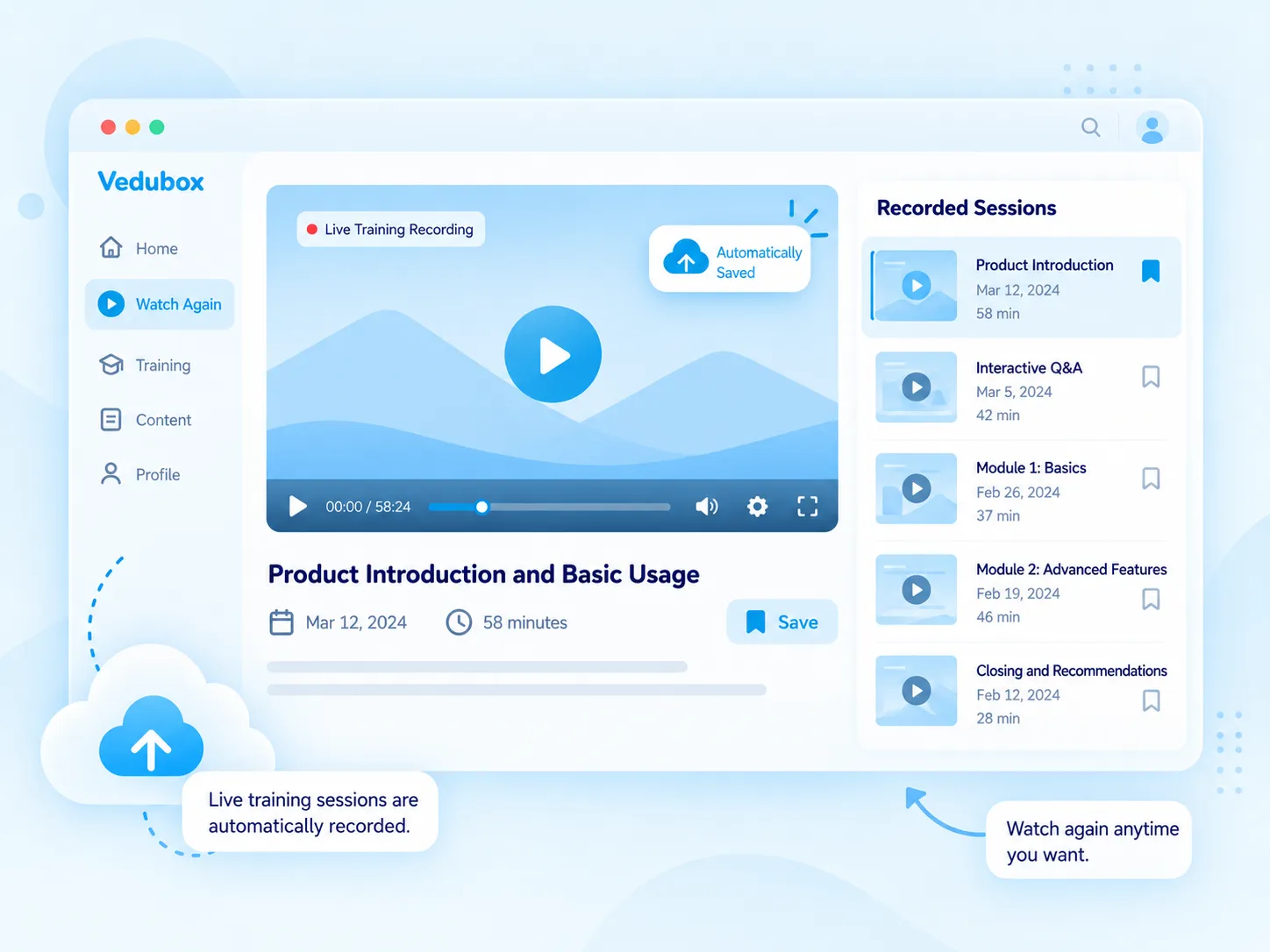
With the Watch Again feature of Vedubox Live, live trainings and events held with video conferencing systems are automatically recorded to the cloud. Users registered on the relevant training can watch the recordings of broadcasts again whenever they like.

Live classes are recorded to the cloud automatically

Filter by date and category

Only registered people can access

See who watched in a report
What Is Watch Again?
With the Watch Again module, your live meetings and trainings are automatically recorded to the cloud without extra staff and can be watched again whenever needed. Cloud recording can be enabled for all trainings or only for specific ones.
Only people registered on the relevant training can access the recordings. Recordings are filtered by title, date and category; recording types such as speaker + screen share or gallery view can be selected.
What Does Your Organisation Gain?
An employee who can’t attend a live training doesn’t miss the topic; the recording is ready to watch whenever they like. No technical staff are needed for archiving.
You see in a report who watched which recording, and you decide how long recordings are kept and whether they can be downloaded.

What Can You Do?
All the options for Watch Again at a glance.
<style>.nk .nw-sar{flex-wrap:wrap;align-content:center;gap:6px}.nw-cip{display:inline-flex;align-items:center;gap:6px;padding:6px 11px;border-radius:999px;background:#f4f8fb;border:1px solid #e3ebf2;font-size:13px;font-weight:700;color:#5b6b80;white-space:nowrap}.nw-cip img{width:16px;height:16px}.nw-cip.nw-mavi{background:#eef8fe;border-color:#bfe3f4;color:#1581b3}.nk .nk-w{gap:12px}.nk .nw-seg label,.nk .nw-anahtar{position:relative;display:block;margin:0;font-weight:inherit;cursor:pointer}.nw-seg input,.nw-anahtar input{position:absolute;opacity:0;pointer-events:none}.nw-seg{display:inline-flex;gap:2px;padding:4px;border-radius:12px;background:#eef2f6}.nw-seg span{display:block;padding:8px 12px;border-radius:9px;font-size:13px;font-weight:700;color:#64748b;white-space:nowrap;transition:background-color .2s ease,color .2s ease,box-shadow .2s ease}.nw-seg input:checked+span{background:#fff;color:#1581b3;box-shadow:0 2px 8px -3px rgba(15,50,90,.3)}.nk .nw-anahtar{display:inline-flex;align-items:center;gap:12px}.nw-anahtar i{position:relative;width:46px;height:26px;border-radius:999px;background:#cbd5e1;transition:background-color .25s ease}.nw-anahtar i::after{content:"";position:absolute;top:3px;left:3px;width:20px;height:20px;border-radius:50%;background:#fff;box-shadow:0 2px 6px rgba(15,50,90,.25);transition:transform .25s ease}.nw-anahtar input:checked+i{background:#28aae1}.nw-anahtar input:checked+i::after{transform:translateX(20px)}.nw-anahtar span{font-size:14.5px;font-weight:700;color:#1a1a2e}.nw-ilerleme{display:flex;flex-direction:column;gap:9px;width:210px;font-size:13.5px;font-weight:600;color:#475569}.nw-ilerleme b{color:#1581b3}.nw-bar{height:8px;overflow:hidden;border-radius:8px;background:#e8eff5}.nw-bar i{display:block;height:100%;border-radius:8px;background:#28aae1}.nw-rec{display:inline-flex;align-items:center;gap:8px;padding:8px 12px;border-radius:10px;background:#0b1f3b;color:#fff;font-size:13px;font-weight:700;white-space:nowrap}.nw-rec i{width:9px;height:9px;border-radius:50%;background:#5cc3ee;animation:nw-nabiz 1.4s ease-out infinite}.nw-balon{max-width:260px;padding:9px 13px;border-radius:14px 14px 14px 4px;background:#f4f8fb;border:1px solid #e3ebf2;font-size:13px;line-height:1.35;color:#475569}.nw-balon b{display:block;margin-bottom:2px;font-size:11px;letter-spacing:.08em;text-transform:uppercase;color:#1581b3}@keyframes nw-nabiz{0%{box-shadow:0 0 0 0 rgba(92,195,238,.7)}100%{box-shadow:0 0 0 8px rgba(92,195,238,0)}}</style><div class="nk-hucre"><div class="nk-w"><span class="nw-rec"><i></i>Recording</span><span class="nw-cip nw-mavi"><img src="https://cdn.prod.website-files.com/6a82b639f1023abfc739174e/6abd26b34654df84e5bd0a25_oz-ozellik-ikon-cloud-upload.png" alt="">To the cloud</span></div><h3>Record to the Cloud Automatically</h3><p>Live classes and meetings are recorded to the cloud automatically, without extra staff.</p></div><div class="nk-hucre"><div class="nk-w"><div class="nw-seg"><label><input type="radio" name="tk-tip" checked><span>Speaker + Screen</span></label><label><input type="radio" name="tk-tip"><span>Gallery</span></label></div></div><h3>Choose the Recording View</h3><p>Let people watch with a speaker + screen share or gallery view.</p></div><div class="nk-hucre"><div class="nk-w nw-sar"><span class="nw-cip nw-mavi"><img src="https://cdn.prod.website-files.com/6a82b639f1023abfc739174e/6abd26b345c61e214e6b7794_oz-tekrar-serit-2.png" alt="">Date</span><span class="nw-cip">Category</span><span class="nw-cip">Title</span></div><h3>Filter Recordings</h3><p>Sort recordings by title, date and training category.</p></div><div class="nk-hucre"><div class="nk-w"><div class="nw-ilerleme"><span><b>18</b> / 24 people watched</span><div class="nw-bar"><i style="width:75%"></i></div></div></div><h3>See the Viewing Report</h3><p>See in the report who watched which recording, and download the report.</p></div><div class="nk-hucre"><div class="nk-w"><div class="nw-balon"><b>Chat</b>Will the presentation file be shared?</div></div><h3>Access the Chat History</h3><p>Chat messages written during the broadcast are shown together with the recording.</p></div><div class="nk-hucre"><div class="nk-w"><label class="nw-anahtar"><input type="checkbox" checked><i></i><span>Allow downloads</span></label></div><h3>Download and Retention</h3><p>Make recordings downloadable; automatically delete or keep recordings at set intervals.</p></div>
What Changes with Watch Again?
The same live class, a recording you never miss.





Let no live class be missed.
Automatic recording, easy access and a viewing report in one module.
.svg)