Web TV
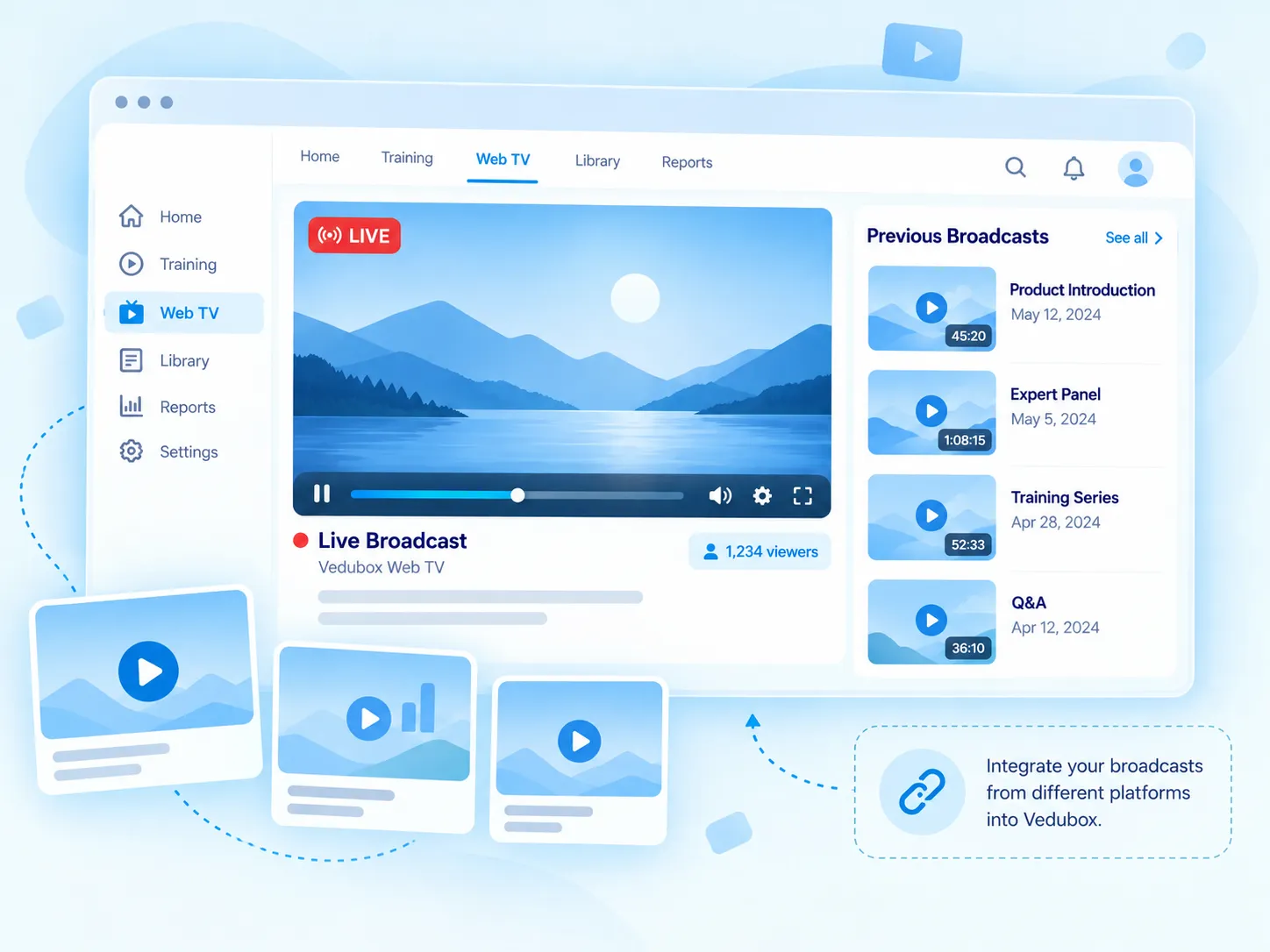
With Vedubox Web TV, embed the live broadcast you run on platforms such as YouTube and Vimeo into your system. Users watch the broadcast and its post-broadcast replays through Vedubox without going to other platforms.

Embed the live broadcast in the system

Users join in one click

Watch again from the archive

Reach it from the calendar and widget
What Is Web TV?
With the Vedubox Web TV module, you can embed a live broadcast you run on another platform such as YouTube or Vimeo into your Vedubox system and present it to your users. Users watch the broadcast inside the system without going to other platforms.
Broadcasts are stored in the archive and can be watched again afterwards. You can also add a Web TV broadcast as a live training, so users can join the broadcast via the calendar and home page widget.
What Does Your Organisation Gain?
Your general meetings, launches or internal broadcasts are watched from a single channel of your own; users don’t have to deal with scattered links.
Recordings stay in the archive after the broadcast; those who couldn’t attend watch later, and you manage your broadcasts together with your training calendar.

What Can You Do?
All the options for Web TV at a glance.
<style>.nk .nw-sar{flex-wrap:wrap;align-content:center;gap:6px}.nw-cip{display:inline-flex;align-items:center;gap:6px;padding:6px 11px;border-radius:999px;background:#f4f8fb;border:1px solid #e3ebf2;font-size:13px;font-weight:700;color:#5b6b80;white-space:nowrap}.nw-cip img{width:16px;height:16px}.nw-cip.nw-mavi{background:#eef8fe;border-color:#bfe3f4;color:#1581b3}.nk .nk-w{gap:12px}.nw-liste{display:flex;flex-direction:column;gap:6px;width:230px}.nw-liste div{display:flex;align-items:center;justify-content:space-between;gap:10px;padding:5px 10px;border-radius:9px;background:#f5f8fb;border:1px solid #e8eef4;font-size:13px;font-weight:600;color:#475569}.nw-liste b{font-weight:800;color:#1581b3}.nw-buton{display:inline-flex;align-items:center;gap:8px;padding:10px 16px;border-radius:999px;border:1.5px solid #28aae1;background:#fff;font-size:14px;font-weight:700;color:#1581b3;transition:background-color .2s ease}.nw-buton img{width:18px;height:18px;transition:transform .3s ease}.nk-hucre:hover .nw-buton{background:#eef8fe}.nk-hucre:hover .nw-buton img{transform:translate(2px,-2px)}.nw-takvim{display:grid;grid-template-columns:repeat(5,44px);gap:6px}.nw-takvim span{position:relative;display:flex;flex-direction:column;align-items:center;justify-content:center;height:52px;border-radius:10px;border:1px solid #e3ebf2;background:#fff;font-size:11px;font-weight:700;color:#94a3b8}.nw-takvim b{font-size:15px;color:#1a1a2e}.nw-takvim .nw-etiketli{background:#eef8fe;border-color:#bfe3f4}.nw-takvim em{position:absolute;bottom:-19px;padding:1px 6px;border-radius:6px;background:#28aae1;color:#fff;font-style:normal;font-size:9.5px;font-weight:800}.nw-buton.nw-dolu{background:#28aae1;color:#fff}.nk-hucre:hover .nw-buton.nw-dolu{background:#1b95cc}.nw-oynatici{position:relative;display:flex;align-items:flex-end;gap:10px;width:220px;height:62px;padding:8px 10px;overflow:hidden;border-radius:12px;background:linear-gradient(135deg,#1e3a5f,#0b1f3b)}.nw-oynatici img{flex:none;width:22px;height:22px}.nw-oynatici b{flex:1;height:4px;margin-bottom:9px;border-radius:4px;background:linear-gradient(90deg,#28aae1 0 70%,rgba(255,255,255,.3) 70%)}.nw-canli{position:absolute;top:8px;left:10px;display:inline-flex;align-items:center;gap:5px;padding:2px 7px;border-radius:6px;background:#28aae1;color:#fff;font-size:10px;font-weight:800;letter-spacing:.06em}.nw-canli i{width:6px;height:6px;border-radius:50%;background:#fff;animation:nw-yanip 1.2s steps(1) infinite}.nk .nw-akis{gap:8px}.nw-akis b{font-weight:800;color:#28aae1;transition:transform .35s ease}.nk-hucre:hover .nw-akis b{transform:translateX(4px)}@keyframes nw-yanip{50%{opacity:.25}}</style><div class="nk-hucre"><div class="nk-w"><div class="nw-oynatici"><span class="nw-canli"><i></i>LIVE</span><img src="https://cdn.prod.website-files.com/6a82b639f1023abfc739174e/6abd214b7babc0c8d087d97a_oz-ozellik-kp-oynat.png" alt=""><b></b></div></div><h3>Embed the Live Broadcast</h3><p>Embed a live broadcast from platforms such as YouTube and Vimeo into Vedubox.</p></div><div class="nk-hucre"><div class="nk-w"><span class="nw-buton nw-dolu"><img src="https://cdn.prod.website-files.com/6a82b639f1023abfc739174e/6abd214b7babc0c8d087d97a_oz-ozellik-kp-oynat.png" alt="">Broadcast started</span></div><h3>Join in One Click</h3><p>Users start watching the live broadcast with the “Broadcast started” button.</p></div><div class="nk-hucre"><div class="nk-w"><div class="nw-liste"><div><span>12.09 · General meeting</span><b>Watch again</b></div><div><span>05.09 · Product launch</span><b>Watch again</b></div></div></div><h3>Broadcast Archive</h3><p>Past broadcasts build up in the archive, and users watch them again whenever they like.</p></div><div class="nk-hucre"><div class="nk-w nw-akis"><span class="nw-cip">Web TV broadcast</span><b>→</b><span class="nw-cip nw-mavi">Live training</span></div><h3>Add as a Live Training</h3><p>Add a Web TV broadcast as a live training by choosing the training and trainer.</p></div><div class="nk-hucre"><div class="nk-w"><div class="nw-takvim"><span>Mon<b>12</b></span><span class="nw-etiketli">Tue<b>13</b><em>Live</em></span><span>Wed<b>14</b></span><span>Thu<b>15</b></span><span>Fri<b>16</b></span></div></div><h3>On the Calendar and in the Widget</h3><p>Open a broadcast added as a live training from the calendar and the home page widget.</p></div><div class="nk-hucre"><div class="nk-w nw-sar"><span class="nw-cip nw-mavi">Administrator</span><span class="nw-cip nw-mavi">Trainer</span></div><h3>Let Trainers Broadcast Too</h3><p>Trainers as well as administrators can create Web TV broadcasts.</p></div>
What Changes with Web TV?
The same broadcast, a channel of your own.





Your organisation’s own broadcast channel.
Live broadcast, archive and calendar on one screen.
.svg)