Online Events
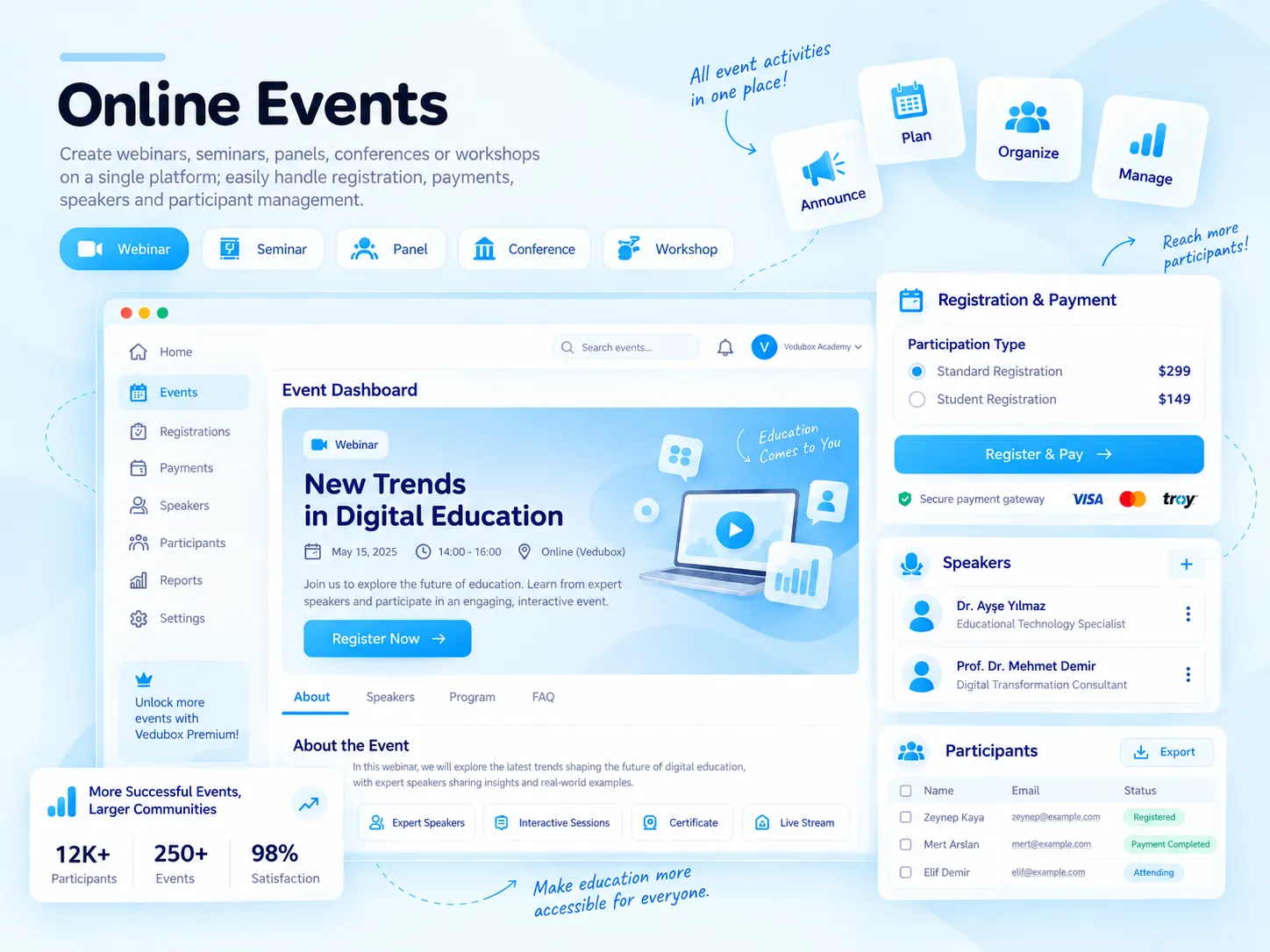
Webinar, seminar, panel, congress or workshop… With the Vedubox Events module, announce your online events on your own dedicated event page; manage registration, payment, speakers and attendees from a single system.

Create an event page

Set registration and attendance limits

Take payment for paid events

Export the attendee list
What Is an Online Event?
With the Vedubox Event Manager module, you organise online events such as webinars, video meetings, seminars, panels, congresses and workshops on a page of your own. You can set the event image, description, date, promo video, attendance limit and event type.
Events work integrated with Zoom and Google Meet; public events are published on your page with their categories and tags. Attendees register with “Sign Up” and join with the “Join Now” button when the event time arrives.
What Does Your Organisation Gain?
You don’t use separate tools for event announcements, registration forms, payment and broadcast; it all comes together in one system, on your organisation’s event page.
Registered attendees get automatic reminders; you export attendee lists and report on the earnings from paid events.

What Can You Do?
All the options for online events at a glance.
<style>.nk .nw-sar{flex-wrap:wrap;align-content:center;gap:6px}.nw-cip{display:inline-flex;align-items:center;gap:6px;padding:6px 11px;border-radius:999px;background:#f4f8fb;border:1px solid #e3ebf2;font-size:13px;font-weight:700;color:#5b6b80;white-space:nowrap}.nw-cip img{width:16px;height:16px}.nw-cip.nw-mavi{background:#eef8fe;border-color:#bfe3f4;color:#1581b3}.nk .nk-w{gap:12px}.nw-durum{display:flex;flex-direction:column;gap:2px;font-size:14px;line-height:1.25;color:#1a1a2e}.nw-durum b{font-weight:700}.nw-durum em{display:inline-flex;align-items:center;gap:6px;font-style:normal;font-size:12.5px;font-weight:700;color:#1581b3}.nw-durum em i{width:7px;height:7px;border-radius:50%;background:#28aae1;box-shadow:0 0 0 3px rgba(40,170,225,.2)}.nk .nw-seg label,.nk .nw-anahtar{position:relative;display:block;margin:0;font-weight:inherit;cursor:pointer}.nw-seg input,.nw-anahtar input{position:absolute;opacity:0;pointer-events:none}.nw-seg{display:inline-flex;gap:2px;padding:4px;border-radius:12px;background:#eef2f6}.nw-seg span{display:block;padding:8px 12px;border-radius:9px;font-size:13px;font-weight:700;color:#64748b;white-space:nowrap;transition:background-color .2s ease,color .2s ease,box-shadow .2s ease}.nw-seg input:checked+span{background:#fff;color:#1581b3;box-shadow:0 2px 8px -3px rgba(15,50,90,.3)}.nk .nw-anahtar{display:inline-flex;align-items:center;gap:12px}.nw-anahtar i{position:relative;width:46px;height:26px;border-radius:999px;background:#cbd5e1;transition:background-color .25s ease}.nw-anahtar i::after{content:"";position:absolute;top:3px;left:3px;width:20px;height:20px;border-radius:50%;background:#fff;box-shadow:0 2px 6px rgba(15,50,90,.25);transition:transform .25s ease}.nw-anahtar input:checked+i{background:#28aae1}.nw-anahtar input:checked+i::after{transform:translateX(20px)}.nw-anahtar span{font-size:14.5px;font-weight:700;color:#1a1a2e}.nw-ilerleme{display:flex;flex-direction:column;gap:9px;width:210px;font-size:13.5px;font-weight:600;color:#475569}.nw-ilerleme b{color:#1581b3}.nw-bar{height:8px;overflow:hidden;border-radius:8px;background:#e8eff5}.nw-bar i{display:block;height:100%;border-radius:8px;background:#28aae1}.nw-buton{display:inline-flex;align-items:center;gap:8px;padding:10px 16px;border-radius:999px;border:1.5px solid #28aae1;background:#fff;font-size:14px;font-weight:700;color:#1581b3;transition:background-color .2s ease}.nw-buton img{width:18px;height:18px;transition:transform .3s ease}.nk-hucre:hover .nw-buton{background:#eef8fe}.nk-hucre:hover .nw-buton img{transform:translate(2px,-2px)}.nw-buton.nw-dolu{background:#28aae1;color:#fff}.nk-hucre:hover .nw-buton.nw-dolu{background:#1b95cc}.nw-tarih{flex:none;display:flex;flex-direction:column;align-items:center;justify-content:center;width:48px;height:52px;border-radius:12px;background:#0b1f3b;color:#fff;line-height:1}.nw-tarih b{font-size:19px;font-weight:800}.nw-tarih span{margin-top:3px;font-size:10px;font-weight:800;letter-spacing:.08em;color:#7fcdef}.nw-konusmacilar{display:flex}.nw-konusmacilar span{display:grid;place-items:center;width:38px;height:38px;margin-left:-10px;border-radius:50%;border:2px solid #fff;background:#28aae1;color:#fff;font-size:12px;font-weight:800;transition:margin-left .3s ease}.nw-konusmacilar span:first-child{margin-left:0}.nw-konusmacilar span:nth-child(2){background:#0b1f3b}.nw-konusmacilar span:nth-child(3){background:#7fcdef;color:#0b1f3b}.nk-hucre:hover .nw-konusmacilar span:not(:first-child){margin-left:-4px}</style><div class="nk-hucre"><div class="nk-w"><div class="nw-tarih"><b>24</b><span>OCT</span></div><span class="nw-durum"><b>HR Summit 2026</b><em>Webinar · 14:00</em></span></div><h3>Event Page</h3><p>Create an event page of your own with an image, description, date and promo video.</p></div><div class="nk-hucre"><div class="nk-w"><div class="nw-seg"><label><input type="radio" name="et-tip" checked><span>Webinar</span></label><label><input type="radio" name="et-tip"><span>Video meeting</span></label></div></div><h3>Choose the Event Type</h3><p>Run the event as a webinar or video meeting with the Zoom or Google Meet integration.</p></div><div class="nk-hucre"><div class="nk-w"><div class="nw-ilerleme"><span><b>184</b> / 250 registrations</span><div class="nw-bar"><i style="width:74%"></i></div></div></div><h3>Set an Attendance Limit</h3><p>Put a cap on event registrations and keep track of the remaining places.</p></div><div class="nk-hucre"><div class="nk-w"><div class="nw-konusmacilar"><span>AS</span><span>MJ</span><span>EB</span></div><span class="nw-durum"><b>3 speakers</b><em>Title · LinkedIn</em></span></div><h3>Add Speakers</h3><p>Show speakers on the event page with their name, title, LinkedIn address and photo.</p></div><div class="nk-hucre"><div class="nk-w nw-sar"><span class="nw-buton">Register</span><span class="nw-buton nw-dolu">Join now</span></div><h3>Register, Join Now</h3><p>Attendees register for the event and join with one click when the time comes.</p></div><div class="nk-hucre"><div class="nk-w"><label class="nw-anahtar"><input type="checkbox" checked><i></i><span>Paid event</span></label><span class="nw-cip nw-mavi">£45</span></div><h3>Paid Events</h3><p>For paid events, the attendee pays and their registration is confirmed once payment is complete.</p></div>
What Changes with Online Events?
The same event, a single system.





Take your events digital.
Event page, registration, payment and reporting in one system.
.svg)