Appointment Management
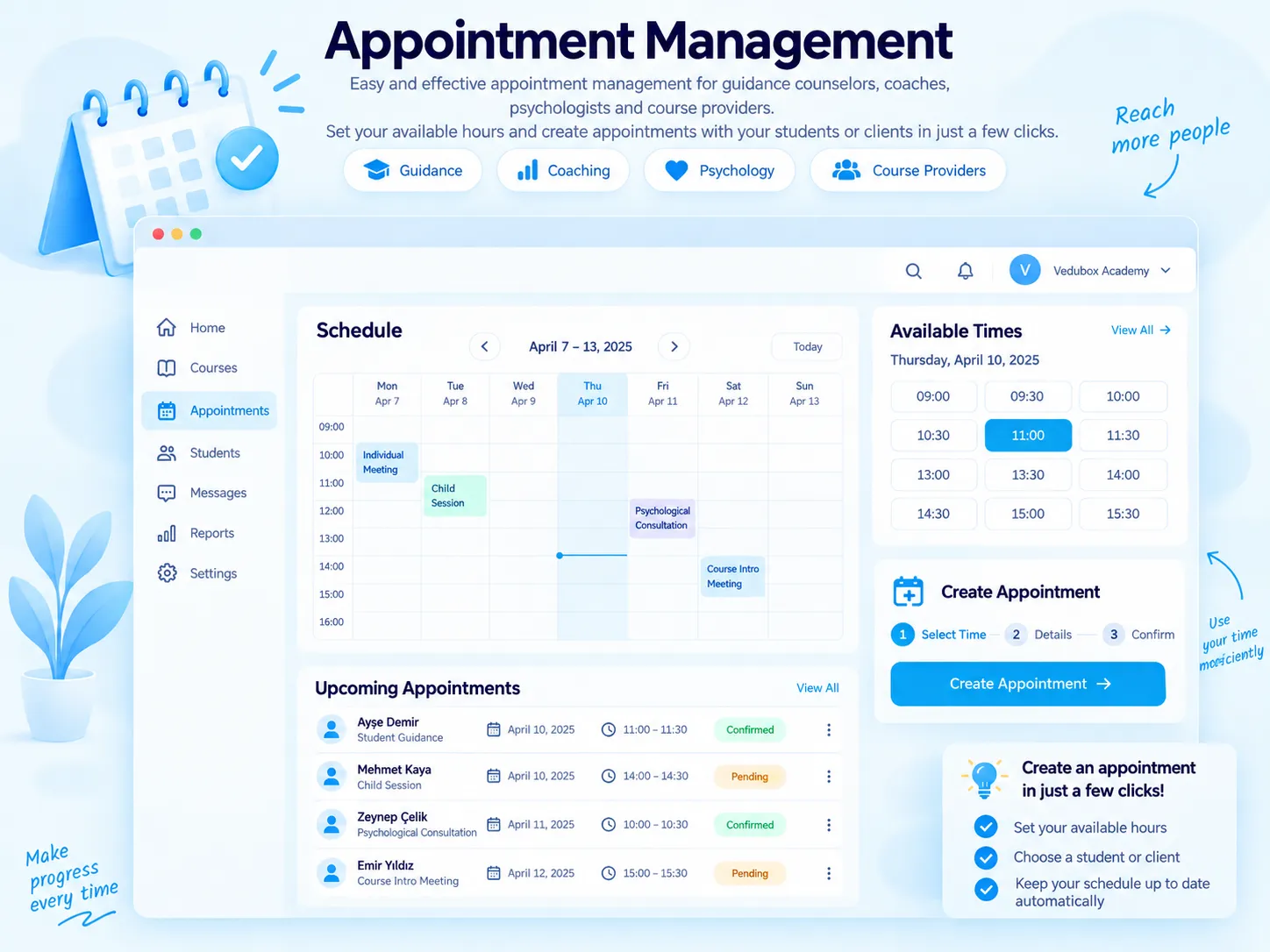
The Vedubox Mentoring Appointment module offers the most practical way to manage appointments for organisations, course providers, coaches, psychologists and anyone who needs it. The trainer sets their available hours, and the user books an appointment in a few clicks.

The trainer sets available hours

Users book appointments easily

Notify by SMS and email

Track appointments on the live calendar
What Is Appointment Management?
With the Vedubox Mentoring Appointment module, users easily create one-to-one mentoring appointments within the criteria set by the system administrator and the trainer. The trainer sets the time slots in which they will accept appointments.
Appointments can be booked per training or per trainer; durations are set between 15 and 60 minutes. When an appointment is created, notifications go out by SMS and email, and meetings are tracked on the live calendar.

What Does Your Organisation Gain?
There is no need for phone and email traffic for mentoring and coaching sessions; the appointment process runs digitally and transparently from start to finish.
Trainers’ calendars stay organised; by limiting the number of appointments users can book per month, you distribute trainer time in a balanced way.

What Can You Do?
All the options for the appointment module at a glance.
<style>.nk .nk-w{gap:12px}.nw-ikonkutu{flex:none;display:grid;place-items:center;width:42px;height:42px;border-radius:12px;background:#e3f3fb}.nw-ikonkutu img{width:22px;height:22px}.nk .nw-seg label,.nk .nw-slotlar label{position:relative;display:block;margin:0;font-weight:inherit;cursor:pointer}.nw-seg input,.nw-slotlar input{position:absolute;opacity:0;pointer-events:none}.nw-seg{display:inline-flex;gap:2px;padding:4px;border-radius:12px;background:#eef2f6}.nw-seg span{display:block;padding:8px 12px;border-radius:9px;font-size:13px;font-weight:700;color:#64748b;white-space:nowrap;transition:background-color .2s ease,color .2s ease,box-shadow .2s ease}.nw-seg input:checked+span{background:#fff;color:#1581b3;box-shadow:0 2px 8px -3px rgba(15,50,90,.3)}.nw-ilerleme{display:flex;flex-direction:column;gap:9px;width:210px;font-size:13.5px;font-weight:600;color:#475569}.nw-ilerleme b{color:#1581b3}.nw-bar{height:8px;overflow:hidden;border-radius:8px;background:#e8eff5}.nw-bar i{display:block;height:100%;border-radius:8px;background:#28aae1}.nw-bildirim{display:flex;align-items:center;gap:10px;padding:9px 14px 9px 9px;border-radius:14px;background:#fff;border:1px solid #e3ebf2;box-shadow:0 12px 24px -16px rgba(15,50,90,.4);font-size:13px;line-height:1.3;color:#5b6b80;transition:transform .35s ease}.nw-bildirim b{display:block;font-size:13.5px;color:#1a1a2e}.nw-bildirim .nw-ikonkutu{width:36px;height:36px;border-radius:10px}.nw-bildirim .nw-ikonkutu img{width:20px;height:20px}.nk-hucre:hover .nw-bildirim{transform:translateY(-4px)}.nk .nw-slotlar{gap:6px}.nw-slotlar span{display:block;padding:8px 11px;border-radius:10px;border:1px solid #dbe6ef;background:#fff;font-size:13px;font-weight:700;color:#475569;font-variant-numeric:tabular-nums;transition:background-color .2s ease,border-color .2s ease,color .2s ease}.nw-slotlar input:checked+span{background:#28aae1;border-color:#28aae1;color:#fff}.nw-slotlar .nw-dolu{background:#f1f4f8;border-color:#e8edf3;color:#b3bfcc;text-decoration:line-through}.nw-takvim{display:grid;grid-template-columns:repeat(5,44px);gap:6px}.nw-takvim span{position:relative;display:flex;flex-direction:column;align-items:center;justify-content:center;height:52px;border-radius:10px;border:1px solid #e3ebf2;background:#fff;font-size:11px;font-weight:700;color:#94a3b8}.nw-takvim b{font-size:15px;color:#1a1a2e}.nw-takvim .nw-etiketli{background:#eef8fe;border-color:#bfe3f4}.nw-takvim em{position:absolute;bottom:-19px;padding:1px 6px;border-radius:6px;background:#28aae1;color:#fff;font-style:normal;font-size:9.5px;font-weight:800}</style><div class="nk-hucre"><div class="nk-w nw-slotlar"><label><input type="radio" name="rv-saat" checked><span>10:00</span></label><label><input type="radio" name="rv-saat"><span>10:30</span></label><label><input type="radio" name="rv-saat"><span>11:00</span></label><span class="nw-dolu">14:00</span></div><h3>Set Available Times</h3><p>The trainer sets the time slots in which they will accept appointments, and the user chooses from them.</p></div><div class="nk-hucre"><div class="nk-w"><div class="nw-seg"><label><input type="radio" name="rv-sure"><span>15</span></label><label><input type="radio" name="rv-sure" checked><span>30</span></label><label><input type="radio" name="rv-sure"><span>45</span></label><label><input type="radio" name="rv-sure"><span>60 min</span></label></div></div><h3>Set the Duration</h3><p>Set the appointment duration to 15, 20, 30, 40, 45 or 60 minutes.</p></div><div class="nk-hucre"><div class="nk-w"><div class="nw-seg"><label><input type="radio" name="rv-yontem" checked><span>Per trainer</span></label><label><input type="radio" name="rv-yontem"><span>Per training</span></label></div></div><h3>Per Training or Per Trainer</h3><p>Choose whether appointments are booked through a training or a trainer.</p></div><div class="nk-hucre"><div class="nk-w"><div class="nw-bildirim"><span class="nw-ikonkutu"><img src="https://cdn.prod.website-files.com/6a82b639f1023abfc739174e/6abd26ad778415869fa7a385_oz-bildirim-serit-2.png" alt=""></span><span><b>Appointment created</b>14 Sep, 14:00 · 30 min</span></div></div><h3>Notify by SMS and Email</h3><p>When an appointment is created, the trainer and the user are notified by SMS and email.</p></div><div class="nk-hucre"><div class="nk-w"><div class="nw-ilerleme"><span>This month <b>2</b> / 4 appointments</span><div class="nw-bar"><i style="width:50%"></i></div></div></div><h3>Set a Monthly Limit</h3><p>Limit the number of appointments a user can book per month.</p></div><div class="nk-hucre"><div class="nk-w"><div class="nw-takvim"><span>Mon<b>12</b></span><span>Tue<b>13</b></span><span class="nw-etiketli">Wed<b>14</b><em>Booked</em></span><span>Thu<b>15</b></span><span>Fri<b>16</b></span></div></div><h3>Track on the Live Calendar</h3><p>Appointments appear on the trainer’s live calendar with the “Booked” label.</p></div>
What Changes with Appointment Management?
The same meetings, far better organised.





Manage appointments with ease.
Available hours, notifications and a live calendar in one module.
.svg)