








In 2020, when the pandemic hit, tools like Zoom, Microsoft Teams, and even Google Meet helped many independent online course creators and training providers stay in business. These tools kept the wheels turning.
Over five years have past and some may still think that digital meeting rooms are an adequate solution. The reality is that you need more complex systems to replace the old ways of handling training and education. Technically, you can rely solely on a single tool to keep your online course alive, but barely.
If you want to scale and thrive, however, you need to upgrade your arsenal. You need a platform, an ecosystem, specifically designed for interaction, measurable knowledge transfer, and in some cases, pedagogy.
Meeting Rooms vs. Learning Spaces
The fundamental — and obvious — difference between video conferencing and virtual classroom software lies in their purpose. While the former is for communication, the latter is for education.
Meeting Rooms
Virtual meeting tools are incredibly practical for meetings, quick catch-ups, and even for webinars. Their core audio, video, screen sharing, and chat features maintain the conversation flow; they excel at essential communication.
Sometimes you can integrate interactive elements, such as quizzes or polls, to make the session more engaging. However, things start to get scattered when you want to develop a comprehensive course. In that case, you will need advanced features to organize office hours, discussion threads, media catalogs, etc.
Learning Spaces
A virtual classroom experience is not complete without interactive whiteboards, breakout rooms with host oversight, integrated quizzes, and advanced data analysis and reporting tools that facilitate active learning. The goal is to encourage participation and to measure knowledge transfer and skill acquisition.
Learning management systems usually include the features you need to build a complete learning space, or they offer easy integrations with industry-leading tools.
Must-have Features of a Virtual Learning Platform
Let’s dive a bit deeper into what makes a virtual classroom platform. If you’re evaluating platforms for your next training rollout, there are ‘must-have’s and ‘nice-to-have’s. To avoid taking up your time, we’ll just list the non-negotiables. If you want to discuss which features improve your experience, don’t hesitate to contact us.
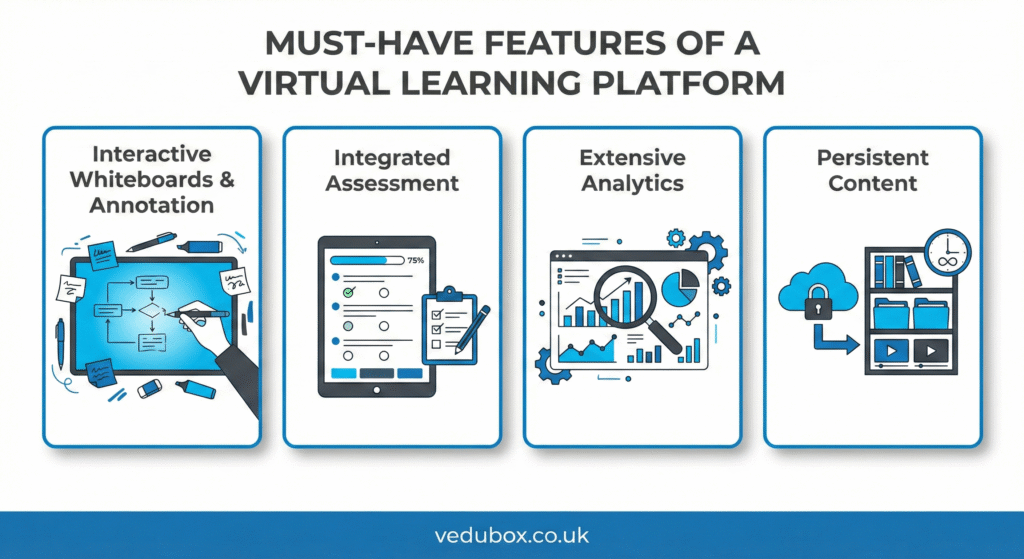
1. Interactive Whiteboards & Annotation
An interactive whiteboard stimulates collaboration. It goes beyond a simple screenshare and invites all learners to mark up, solve problems, and contribute visually in real time. They are no longer passive observers, but true participants.
2. Integrated Assessment
Integrated assessment tools are highly effective at maintaining audience attention. For example, you can launch a pop quiz or poll to keep your learners’ focus on your lecture or presentation.
Instant feedback is key to retention. Additionally, your platform should automatically grade responses and display results immediately. So, you can adjust your pace or revise challenging topics instantly.
3. Extensive Analytics
Detailed analytics and reporting tools are a major differentiator between ‘meeting rooms’ and ‘virtual classes.’ You can have a detailed analysis of performance, retention, engagement, participation, grading, and, of course, completion.
4. Persistent Content
Chat logs in video conferencing tools are mostly temporary. When the call ends, they vanish, and video recordings are mostly not accessible to the parties other than the organizer or stored in the cloud, often under awkwardly named folders.
You can have them all in one place, in order, in a professional virtual environment, so anyone can easily access the session, watch the video recording, and read the notes and annotations.
Engagement and Inclusion
A key benefit of upgrading to a dedicated system is the ability to structure activities that boost engagement and inclusion. A study by Valeriu Crudu and MoldStud Research Team shows that interactive elements in education increase knowledge retention by up to 60 percent.
Managing large groups of learners can be tough, so breakout sessions come to the rescue. Platforms that enable breakout rooms help students have real-time discussions and increase collaboration, as a result, contributing to knowledge preservation.
Accessibility and Diversity
Features such as live captions, transcripts, downloadable resources, and micro-learning modules support inclusivity. None of your students feels left out.
The All-in-One Solution
If your current setup involves a messy collection of five different subscriptions — Zoom for video, Typeform for quizzes, Slack for post-class chat, Dropbox for files, and a spreadsheet for attendance — you are wasting time and budget.
Vedubox integrates the complete experience directly into a powerful learning management system. It offers a straightforward, user-friendly experience to teachers and learners.
Attendance is automatically recorded in user profiles, quiz results are synced to progress reports, and class materials are permanently stored in content libraries. No CSV exports needed, no external links to manage, and no more technical admin struggles.
As we move further into the decade, a ‘good enough’ remote learning experience isn’t adequate. To retain students and grow your teaching business by successfully selling premium online courses, you must offer a smooth, professional, and interactive experience.
Book a quick, no-obligation demo with Vedubox today to see the difference a purpose-built virtual classroom platform can make.